> ## Documentation Index
> Fetch the complete documentation index at: https://docs.getwhitewhale.com/llms.txt
> Use this file to discover all available pages before exploring further.
# Adjusting Your Suggestions
> Invite unlimited team members to WhiteWhale at no extra cost. Configure roles, permissions, and account visibility so every rep sees the right signals.
Account Suggestions will never be perfect — but with a few adjustments, 80–90% of what surfaces should be accounts you'd actually want to work. This page covers how to tune your search when results are too broad, too narrow, or just slightly off.
## How to edit your search
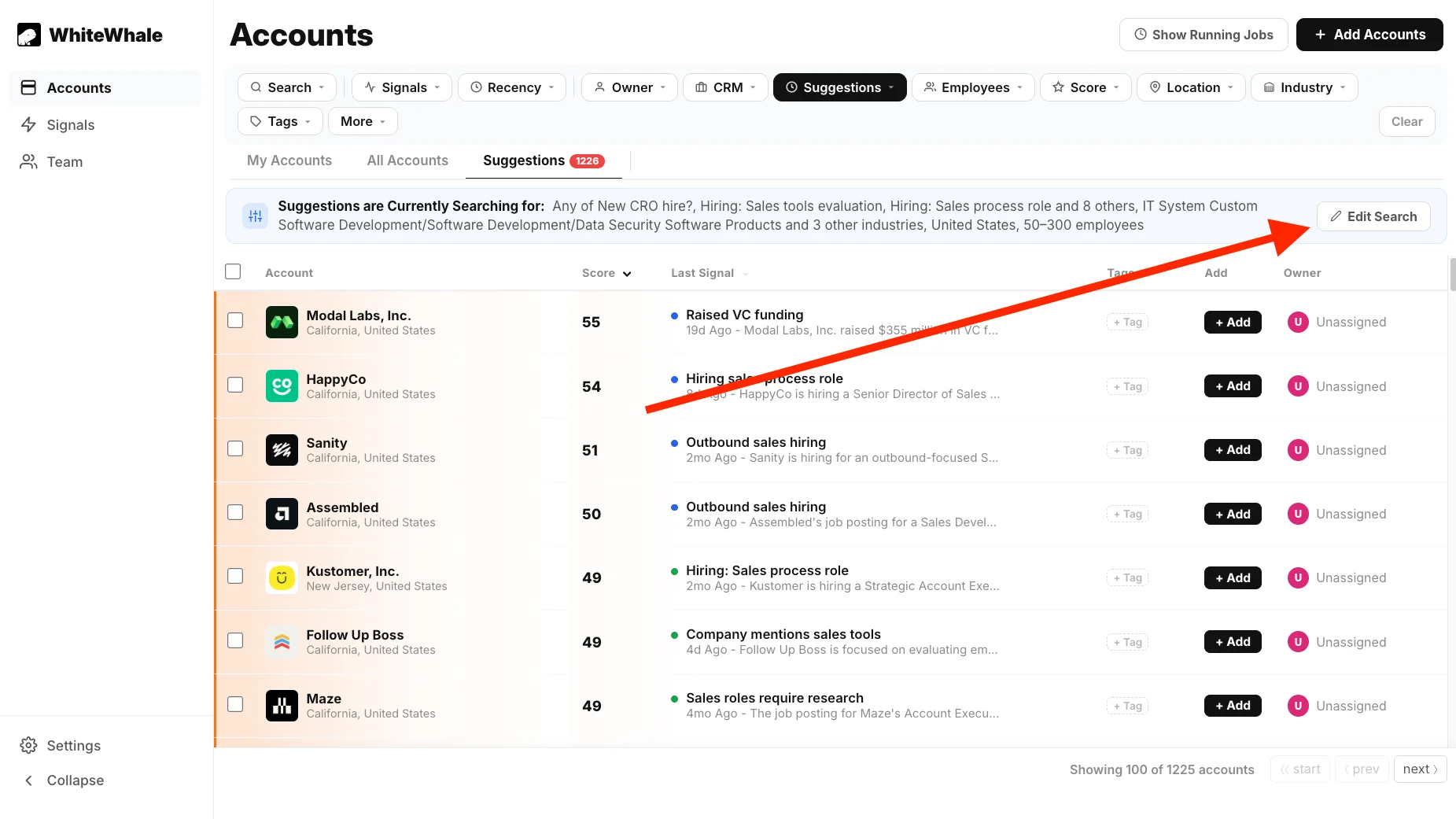
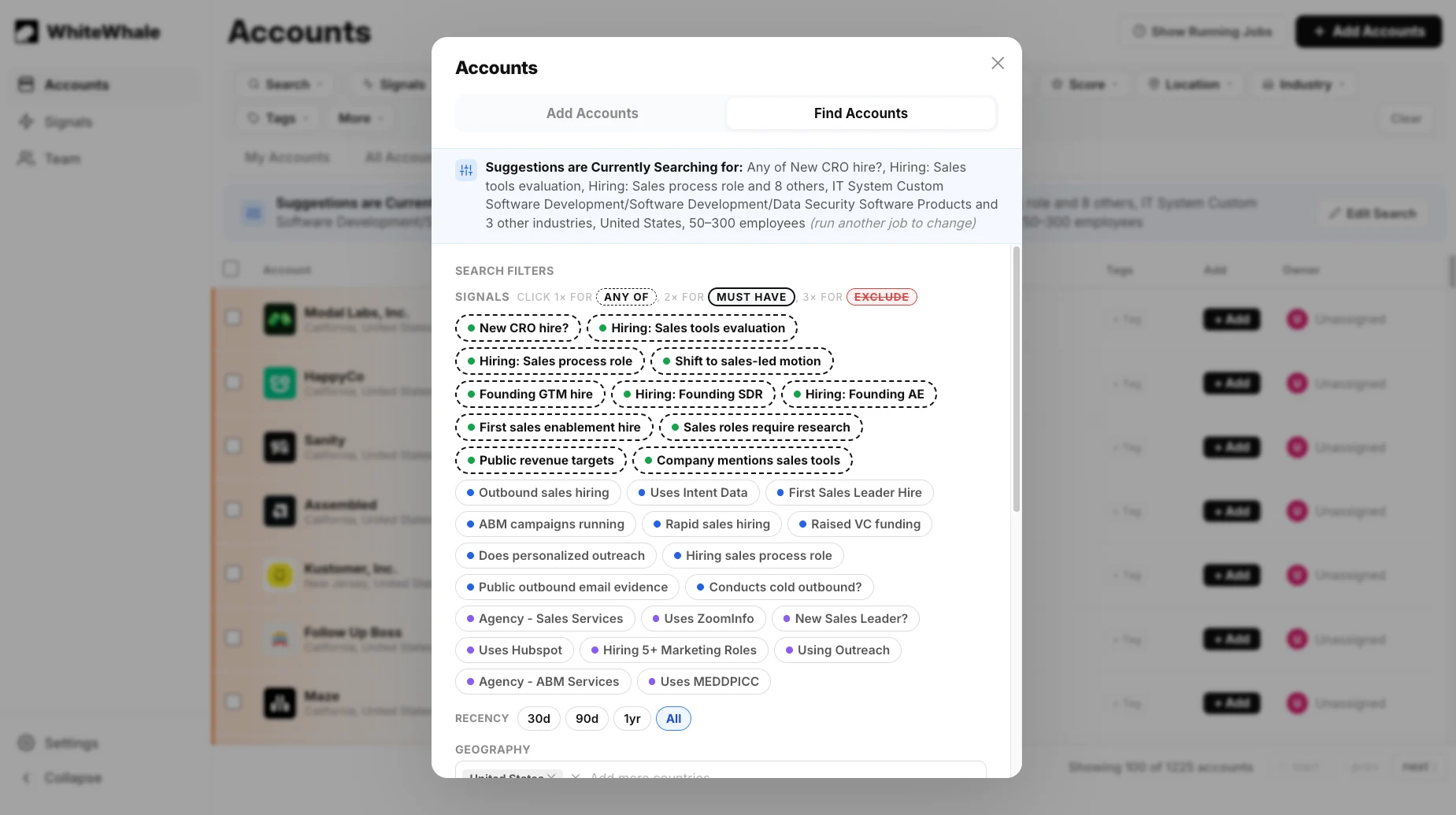
From the **Suggestions** tab, click **Edit Search**. This opens the same Find Accounts table you used during setup.
 From here you can change any of your filters — signals, geography, industries, or employee count — and re-run the search.
 ## What to adjust and when
Your filters are too broad. Try one or more of these:
* **Tighten your industry list** — remove industries where you rarely win deals
* **Narrow your employee count range** — if your sweet spot is 100–500, don't include 10–50
* **Add a signal filter** — require at least one signal to be present before an account surfaces. Set it to **Any Of** so you're not excluding too much.
* **Tighten your geography** — if you only serve certain US states or countries, make sure that's reflected
Your filters are too narrow. The most common cause is too many **Must Have** signals. Try one or more of these:
* **Switch Must Have signals to Any Of** — this alone usually fixes a near-zero result count
* **Remove signal filters entirely** — let firmographics do the filtering and use signals just for ranking
* **Expand your industry list** — add adjacent industries where you've won deals before
* **Widen your employee count range** — try going slightly above or below your typical range
Your firmographic filters need refinement. Try:
* **Revisiting your industry list** — go to LinkedIn, look up 5–10 of your best current customers, and check which industry they've selected. Make sure all of them are in your filter.
* **Adjusting employee count** — if the accounts feel too small or too large, tighten the range
* **Adding a geography constraint** — if you're seeing accounts from regions you don't serve, filter them out
Your signal list may need a refresh. Suggestions surfaces accounts that have matched your signals — if the signals aren't specific enough to your ICP, the matches won't feel relevant.
See [How to Get Unique Signal Ideas](/how-to-get-unique-signal-ideas) for a guide on writing signals that surface actual buying moments.
## Set realistic expectations
The goal isn't a perfect list — it's a high-signal queue where the majority of what surfaces is worth a look. Here's what good looks like in practice:
* **80–90% of suggestions** should be companies you'd consider reaching out to
* **Some will be off** — That's expected. Use the feedback tools to train the system over time.
* **Results improve as you iterate** — each adjustment compounds. A search you've tuned over a few weeks will perform significantly better than one you set up once and never touched.
After any adjustment, give the search 24–48 hours before evaluating. WhiteWhale scans accounts on a daily cycle, so changes take a full pass to fully reflect in your results.
## Related
Mark suggestions as good or bad fit to help WhiteWhale improve over time.
Review the full setup guide if you want to start your search from scratch.
Better signals lead to better suggestions.
Fix signals that are too broad or returning the wrong results.
## What to adjust and when
Your filters are too broad. Try one or more of these:
* **Tighten your industry list** — remove industries where you rarely win deals
* **Narrow your employee count range** — if your sweet spot is 100–500, don't include 10–50
* **Add a signal filter** — require at least one signal to be present before an account surfaces. Set it to **Any Of** so you're not excluding too much.
* **Tighten your geography** — if you only serve certain US states or countries, make sure that's reflected
Your filters are too narrow. The most common cause is too many **Must Have** signals. Try one or more of these:
* **Switch Must Have signals to Any Of** — this alone usually fixes a near-zero result count
* **Remove signal filters entirely** — let firmographics do the filtering and use signals just for ranking
* **Expand your industry list** — add adjacent industries where you've won deals before
* **Widen your employee count range** — try going slightly above or below your typical range
Your firmographic filters need refinement. Try:
* **Revisiting your industry list** — go to LinkedIn, look up 5–10 of your best current customers, and check which industry they've selected. Make sure all of them are in your filter.
* **Adjusting employee count** — if the accounts feel too small or too large, tighten the range
* **Adding a geography constraint** — if you're seeing accounts from regions you don't serve, filter them out
Your signal list may need a refresh. Suggestions surfaces accounts that have matched your signals — if the signals aren't specific enough to your ICP, the matches won't feel relevant.
See [How to Get Unique Signal Ideas](/how-to-get-unique-signal-ideas) for a guide on writing signals that surface actual buying moments.
## Set realistic expectations
The goal isn't a perfect list — it's a high-signal queue where the majority of what surfaces is worth a look. Here's what good looks like in practice:
* **80–90% of suggestions** should be companies you'd consider reaching out to
* **Some will be off** — That's expected. Use the feedback tools to train the system over time.
* **Results improve as you iterate** — each adjustment compounds. A search you've tuned over a few weeks will perform significantly better than one you set up once and never touched.
After any adjustment, give the search 24–48 hours before evaluating. WhiteWhale scans accounts on a daily cycle, so changes take a full pass to fully reflect in your results.
## Related
Mark suggestions as good or bad fit to help WhiteWhale improve over time.
Review the full setup guide if you want to start your search from scratch.
Better signals lead to better suggestions.
Fix signals that are too broad or returning the wrong results.