> ## Documentation Index
> Fetch the complete documentation index at: https://docs.getwhitewhale.com/llms.txt
> Use this file to discover all available pages before exploring further.
# Pre-Meeting Research Brief
> Get an automatic research brief with buying signals and Why Now context delivered 24 hours before every meeting. Works with Google Calendar and tracked accounts.
WhiteWhale connects to your Google Calendar and automatically prepares a research brief before any meeting with a tracked account. No manual prep needed — the brief lands in your inbox 24 hours before the call.
## What's in the brief
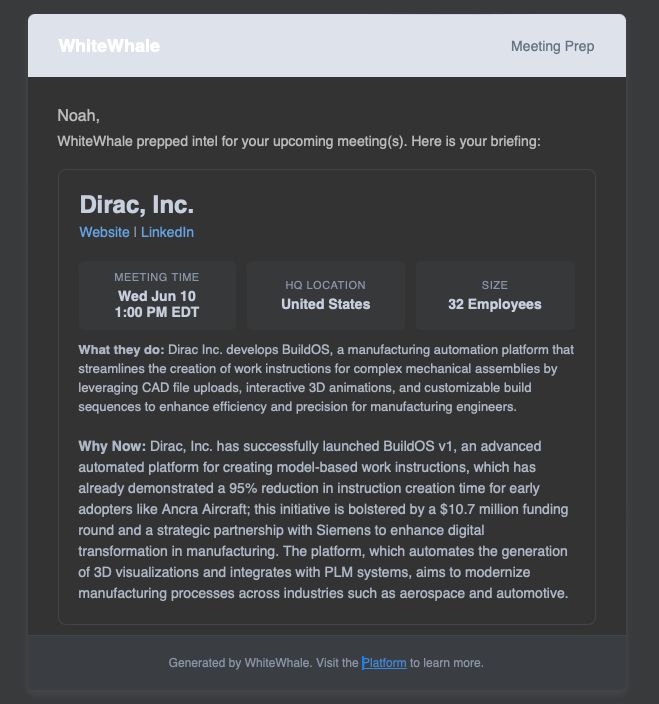 Every brief includes:
* **Meeting time, HQ location, and company size** at a glance
* **What they do** — a plain-English summary of the company and what they build
* **Why Now** — the signal story: what's changed recently, what they're trying to achieve, and why now is the right time to be in front of them
## How to connect Google Calendar
In the left nav, go to **Settings** → **Integrations**.
Follow the prompts to authorize WhiteWhale to access your calendar.
You'll be asked to select one of three modes:
WhiteWhale analyzes your upcoming meetings and sends a research brief 24 hours before each meeting with a tracked account. Your account list stays as-is — nothing is added automatically.
WhiteWhale sends research briefs **and** automatically adds any account you have a meeting with to your WhiteWhale list. Good for reps who want their calendar to drive their account list. Keep in mind this will use account credits.
Calendar integration is paused. No briefs will be generated and no accounts will be added. Your connection is preserved so you can turn it back on anytime.
Not sure which mode to pick? Start with **On** (research briefs only). You get the full value of pre-meeting prep without touching your account list or credits. Switch to Auto Upload later if you want your calendar to automatically populate your book of business.
## Disconnecting
To disconnect Google Calendar, go to **Settings** → **Integrations** → **Google Calendar** and click **Disconnect**. You can reconnect at any time.
## Related
Understand the Why Now and how to use it to build your outreach angle.
Manually add accounts to your list.
Full setup guide and troubleshooting for the Google Calendar integration.
Every brief includes:
* **Meeting time, HQ location, and company size** at a glance
* **What they do** — a plain-English summary of the company and what they build
* **Why Now** — the signal story: what's changed recently, what they're trying to achieve, and why now is the right time to be in front of them
## How to connect Google Calendar
In the left nav, go to **Settings** → **Integrations**.
Follow the prompts to authorize WhiteWhale to access your calendar.
You'll be asked to select one of three modes:
WhiteWhale analyzes your upcoming meetings and sends a research brief 24 hours before each meeting with a tracked account. Your account list stays as-is — nothing is added automatically.
WhiteWhale sends research briefs **and** automatically adds any account you have a meeting with to your WhiteWhale list. Good for reps who want their calendar to drive their account list. Keep in mind this will use account credits.
Calendar integration is paused. No briefs will be generated and no accounts will be added. Your connection is preserved so you can turn it back on anytime.
Not sure which mode to pick? Start with **On** (research briefs only). You get the full value of pre-meeting prep without touching your account list or credits. Switch to Auto Upload later if you want your calendar to automatically populate your book of business.
## Disconnecting
To disconnect Google Calendar, go to **Settings** → **Integrations** → **Google Calendar** and click **Disconnect**. You can reconnect at any time.
## Related
Understand the Why Now and how to use it to build your outreach angle.
Manually add accounts to your list.
Full setup guide and troubleshooting for the Google Calendar integration.