

Overview
The WhiteWhale API gives you full programmatic access to your account data, signals, users, and Account Suggestions. Common use cases:- Pipe WhiteWhale data into tools not covered by native integrations
- Build your own CRM integration
- Automate account uploads and status changes
- Embed WhiteWhale signal data into your own platform or internal tooling
https://app.getwhitewhale.com/v1
API Docs: https://app.getwhitewhale.com/api_docs
Authentication
Every request requires two headers:Getting your API key
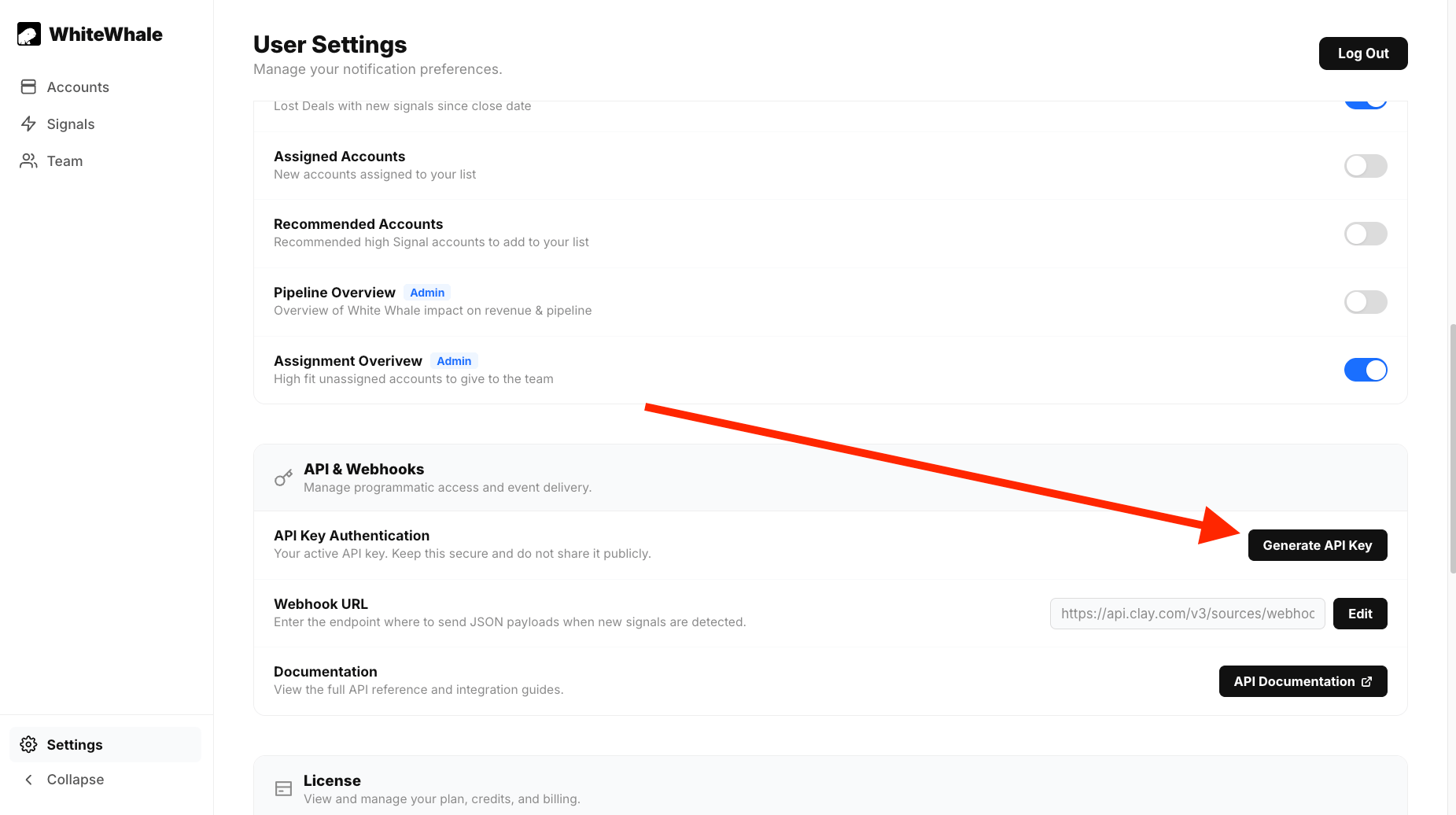
The API key is shared across your whole team — one key per WhiteWhale instance.Go to Settings
Scroll to API & Webhooks
Click Generate API Key
Rate limits & global errors
Rate limit: 600 requests per minute, global across all routes.Endpoints
Accounts
GET /v1/get_accounts — Fetch account data
GET /v1/get_accounts — Fetch account data
Account objects including name, score, status, signal answers, and account details (LinkedIn URL, industry, employee count, etc.)POST /v1/upload_accounts — Add new accounts
POST /v1/upload_accounts — Add new accounts
farsight: true (default), uploaded accounts land in Account Suggestions and must be activated. If you have a webhook configured, you’ll receive a pre-score payload when they’re ready. If farsight: false, accounts are immediately active and will consume credits.POST /v1/change_accounts_status — Archive, activate, or delete accounts
POST /v1/change_accounts_status — Archive, activate, or delete accounts
POST /v1/normalize_accounts — Validate and normalize domains
POST /v1/normalize_accounts — Validate and normalize domains
Signals
GET /v1/get_signal_templates — List signal templates
GET /v1/get_signal_templates — List signal templates
Template objects with the question format, a title, whether the template is complete, and examples for templates with placeholders.POST /v1/add_signals — Add signals to an ICP
POST /v1/add_signals — Add signals to an ICP
/v1/get_signal_templates, unless ignore_templates: true is set.Body:0— any account matching this signal is set to an arbitrary negative score. Use to disqualify accounts.6— Account Suggestions uses High-ranked signals to find new accounts. At least one signal of rank6is required for Account Suggestions to work.
POST /v1/delete_signal — Remove a signal
POST /v1/delete_signal — Remove a signal
/v1/get_user_data.Body:Users
GET /v1/get_user_data — Get a user's data
GET /v1/get_user_data — Get a user's data
UserOverview object with:icps— list of ICP namesicp_id_dict— map of ICP name → ICP IDsignals— all signals across the user’s ICPscredits_remaining— remaining account creditsactive_accounts— current active account count
GET /v1/get_all_user_data — List all users in your instance
GET /v1/get_all_user_data — List all users in your instance
UserOverview objects for every user in your WhiteWhale instance. Requires admin authentication.POST /v1/create_user_request — Create a new user
POST /v1/create_user_request — Create a new user
403 if out of user seats. 409 if a user with that email already exists.POST /v1/delete_user_request — Delete a user
POST /v1/delete_user_request — Delete a user
403 if the user is not in your organization.Account Suggestions (ICP)
GET /v1/icp/details — Get ICP details
GET /v1/icp/details — Get ICP details
POST /v1/add_icp — Create a new ICP
POST /v1/add_icp — Create a new ICP
400 if an ICP with that name already exists.POST /v1/swap_icp — Move accounts to a different ICP
POST /v1/swap_icp — Move accounts to a different ICP
POST /v1/delete_icp_request — Delete an ICP
POST /v1/delete_icp_request — Delete an ICP
400 if ICP not found for user. 403 if attempting to delete a Master ICP.POST /v1/icp/farsight_state_switch — Enable or disable Account Suggestions
POST /v1/icp/farsight_state_switch — Enable or disable Account Suggestions
6 (High) is required for Account Suggestions to find new accounts. Account Suggestions runs automatically at 3:00 UTC daily. To trigger immediately, use /v1/icp/run_farsight.POST /v1/icp/run_farsight — Trigger an immediate Account Suggestions scan
POST /v1/icp/run_farsight — Trigger an immediate Account Suggestions scan
POST /v1/icp/farsight_constraints_change — Update Account Suggestions filters
POST /v1/icp/farsight_constraints_change — Update Account Suggestions filters
/v1/utilities/location_codes and valid industries from /v1/utilities/industries.POST /v1/icp/farsight_employee_bounds — Set employee count range
POST /v1/icp/farsight_employee_bounds — Set employee count range
Webhook
POST /v1/set_webhook — Register a webhook URL
POST /v1/set_webhook — Register a webhook URL
POST /v1/test_webhook — Send a test webhook payload
POST /v1/test_webhook — Send a test webhook payload
Utilities
GET /v1/utilities/location_codes — Get valid location codes
GET /v1/utilities/location_codes — Get valid location codes
GET /v1/utilities/industries — Get valid industry codes
GET /v1/utilities/industries — Get valid industry codes